HealthCheck Assistance

The Health Check system provided by The Associated Press monitors numerous attributes of an AP ENPS system to
ensure optimal performance, accessibility, and functionality is
maintained.
The primary utilization of the Health Check is to provide critical warnings for potential issues and general system monitoring to maintain optimized
application functionality and an optimal user experience.
The Health Check works by monitoring various attributes or
properties and checking them against pre-configured thresholds determined by AP staff and informed by our experience supporting ENPS systems in various configurations and deployment environments. These thresholds can be futher customized by a site's system
administrators as they may deem appropriate.
The system supports notifications via e-mail, Slack, or Microsoft Teams. Furthermore, all events are written to the system Event Viewer
logs which enables monitoring and notifications via standard system monitoring/incident management infrastructure which a site may already have deployed.
Details:
By default the Health Check is scheduled to run every 30
minutes. If a critical issue is found, then all enabled channels will be
updated. Critical issues which impair system functionality will continue to send notifications every 30 minutes until resolved. Notifications of less severe issues, which are not impacting system performance, will be repeated with less frequency (i.e. weekly). For example, if the NOM is in blocked mode - which affects core functionality - recipients will
be notified every 30 minutes. If an installed SSL certificate is due to
expire within the threshold set, this could be configured for weekly notifications. Any critical notifications will include a link to the pertinent page of this website which resembles the template structure described below.
They will include one or more of the following sections;
Issue: A short statement on the issue the Health Check has
found.
Description: A slightly more detailed explanation of a topic.
This may include general information or information relating to a specific
issue.
Resolution: Where an issue has been found, a potential solution
is offered.
Thresholds: Where applicable, what thresholds are in use,
what values are set, and where they are found.
Enabling: How and where to enable a section to be included in the Health Check Heartbeat summary.
This website follows the same pattern
as the Heartbeat Summary mails that are sent. Essentially the mail and site have sections by monitored attributes. The site sections are:
Suites Details: General suite details primarily focussed on
informational details. For example, the applications and their versions.
Suite Status: This section focuses on the suite
configurations and their status.
Platform Details: The underlying platform details and status
are presented.
Configurations: This is a web site only section on how the
Health Check system is configured and the numerous options available.
Heartbeat Mail: This is also a web site only section that contains
an explanation of what can be included with the Heartbeat Summary
email.
Help: The last web site only section contains contact points
should they be required.
The Health Check gives you the options to be alerted to potential issues by several different methods:
- E-Mail
- Slack
- MS-Teams
- Windows Event Logs
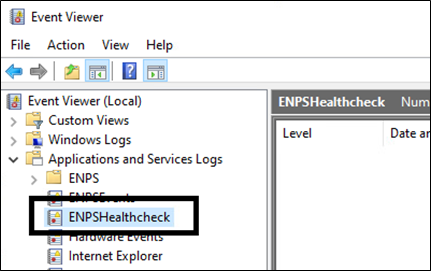
This will be enabled by default with no configuration required. If you have an existing solution that monitors event logs and alerts you to errors, this can also be used to alert you to any issues found by the Healthcheck. The entries will be made in a new log found under "Applications and Services Logs."
For any additional information, clarification or assistance please contact the AP ENPS Support Team.