HealthCheck Assistance

The Health Check has detected that there is an issue with the sockets opened between Solr and the NOM application.
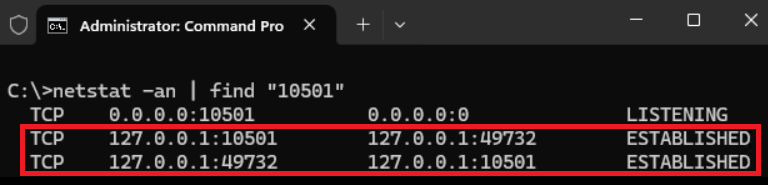
When Solr and the NOM are interacting correctly, there is one ingress and one egress socket opened between the applications. Periodically multiple sockets are opened which can impact both the functionality and provision of the application.
This can be confirmed by executing the following CMD CLI or PowerShell CMDLET. An example of a correct connection is below where there are only two rows returned for port 10501.
To resolve this please restart the Solr service and then restart the NOM application.
To use the Windows GUI:
Press Win + R
Enter "services.msc" and press "Ok"
Scroll down the list of services until you find "SolrjavaServer" and from the upper right options, select "Restart"
To use the Windows CLI:
Press Win + R
Enter "cmd" to open a command line window
Type and execute: net stop solrjavaserver
Type and execute: net start solrjavaserver
To restart the NOM application:
At a convenient time logon the server console
Select the "New Object Manager (NOM)" application
Then select "File | Exit | Yes" to restart the appilcation.
Ensure the application is restarted by the WATCH process.
No thresholds set for this monitoring.